

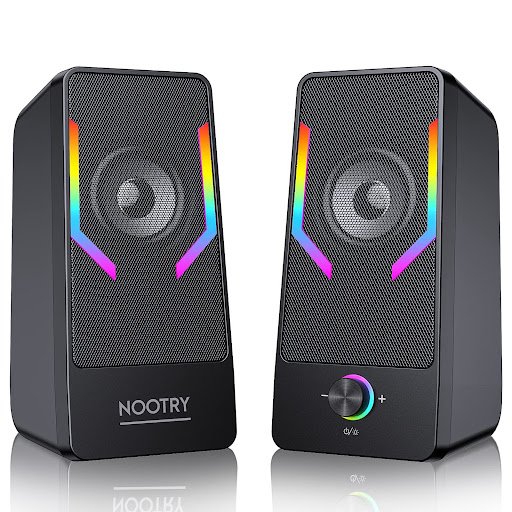
In today’s tech-driven world, enhancing your multimedia experience is not just about owning the best computer setup—it’s also about equipping it with the right sound system. Whether you are a dedicated gamer, a movie enthusiast, or someone who works from home, computer speakers play a vital role in delivering crystal-clear audio. Their performance, design, and connectivity options can make or break your overall experience.
With so many choices available, selecting the perfect set of computer speakers can be a daunting task. This guide will walk you through key aspects such as watts, drivers, and connectivity options to help you make an informed decision while also highlighting the best picks in the market and how to purchase them easily with Bajaj Finserv’s EMI Network Card.
Understanding Watts, Drivers, and Connectivity
Watts, drivers, and connectivity options are essential factors to consider when selecting computer speakers. Understanding these features can ensure you make the right purchase for your specific needs:
- Watts: Speaker wattage tells you about the power output of the speaker. Higher wattage doesn’t always mean better sound but is an indicator of the speaker’s loudness capability. For a desktop computer setup, speakers ranging between 20W to 40W are typically sufficient for everyday use. For bigger sound requirements or gaming setups, higher wattage options are preferable.
- Drivers: Drivers are the components in a speaker that produce sound. They come in various sizes to handle low, mid, and high-range frequencies. Larger drivers (4 inches or above) are ideal for producing fuller, deeper bass, whereas smaller drivers (around 1 to 2 inches) focus on high frequencies. A multi-driver speaker system will generally offer better sound clarity across frequencies.
- Connectivity options: Modern computer speakers boast a variety of connection options, such as Bluetooth, USB, AUX, RCA, and HDMI. Bluetooth speakers provide a wireless experience and are perfect for portability. Wired options, on the other hand, ensure consistent sound quality without lag. Make sure to choose speakers with connectivity options that are compatible with your computer setup.
Features and Benefits of Computer Speakers
When searching for the ideal computer speaker, here are some key features and benefits to consider:
- Wide compatibility: Modern speakers work well with PCs, laptops, gaming consoles, and even smartphones.
- High-quality sound: Good speakers provide immersive sound with enhanced bass, balanced mids, and crisp highs.
- Compact designs: Many speakers are built to fit on computer desks without compromising on sound quality.
- 360° surround sound: Some advanced systems include surround sound to deliver a theater-like experience.
- Integrated controls: Built-in knobs or touch controls allow for quick adjustments to volume, bass, and treble.
- Multiple connectivity options: Having options like Bluetooth, AUX, or USB increases their usability across devices.
- Energy efficiency: Speakers with low power consumption help save electricity without compromising on performance.
Top 5 Best Selling Computer Speakers in the Market
| Model | Price | Key Specifications |
| Logitech Z313 Speaker System | Rs. 3,495 | 50W peak power, subwoofer for deep bass, AUX connectivity. |
| Creative Pebble V3 | Rs. 3,899 | USB-powered, 4.4W RMS output, Bluetooth 5.0. |
| Edifier R1280DB Studio Monitor | Rs. 13,999 | 42W RMS, dual RCA inputs, Bluetooth, wood finish. |
| JBL Quantum Duo | Rs. 12,999 | 20W RMS, RGB lighting, USB and Bluetooth connectivity. |
| F&D F203G 2.1 Speaker System | Rs. 2,290 | 11W RMS, subwoofer for bass, AUX connectivity. |
Buying Guide for Computer Speakers
To make a well-informed decision while shopping for computer speakers, keep these pointers in mind:
- Determine your purpose: Consider whether you need the speakers for gaming, music, movies, or general use.
- Consider size and space: Compact systems are ideal for smaller desks, while bigger setups with subwoofers are perfect for larger spaces.
- Check wattage and power requirements: Ensure the system offers enough power output based on your audio needs.
- Verify compatibility: Always check if your chosen speaker system supports your computer’s operating system and connectivity requirements.
- Assess sound quality: Look for features such as bass enhancements, surround sound, and wide frequency response.
- Budget-conscious shopping: Set a budget and choose the best speakers available within your price range to match your preferences.
Benefits of Buying Through Bajaj Finserv’s Financing Options
Bajaj Finserv’s financing options provide several benefits when purchasing computer speakers:
- Easy EMIs: Bajaj Finserv allows you to split the cost of high-quality computer speakers into affordable monthly installments, reducing the financial burden.
- Zero down payment: You can take home your favorite speaker without paying any upfront amount, giving you immediate access to premium audio systems.
- Flexible tenure: Repayment periods range from 1 to 60 months, allowing you to select the most convenient tenure that aligns with your financial situation.
How to Buy Computer Speakers Using the Bajaj Finserv EMI Network Card
Step 1: Visit a Bajaj Finserv Partner Store
Locate your nearest partner store or browse their online catalog.
Step 2: Choose your preferred brand and model
Select the computer speaker that suits your needs from a wide range of options.
Step 3: Select a suitable easy EMI plan
Opt for an EMI plan with a tenure that best fits your budget and financial preferences.
Step 4: Complete your purchase using the EMI Network Card
Use your Bajaj Finserv EMI Network Card at checkout and enjoy your new speaker system without financial strain.
Conclusion
Investing in the right computer speaker can drastically improve your audio experience, whether you’re gaming, watching movies, or working. By paying attention to features like wattage, drivers, and connectivity, you can choose a system that meets all your needs.
Using Bajaj Finserv’s EMI Network Card makes purchasing premium speakers even easier with flexible financing options such as easy EMIs, zero down payment, and flexible repayment tenure. Follow this comprehensive guide to find the computer speaker that enhances your multimedia experience while optimizing your purchase journey with convenient financing options.
For more information, visit: flywiththought.com


